STOWRA

Changelog

Notable changes to Stowra, release by release.

v1.11.1
September 23, 2026
v1.11.1 · September 23, 2026

A fix that gets 1.11.0 to you.

Fixes
  • Stowra keeps working offline after updating

v1.11.0
September 23, 2026
v1.11.0 · September 23, 2026

A proper welcome to the private beta, and password reset.

Features
  • Your invitation email now opens a welcome page where you choose to sign in with Google or set a password
  • Your workspace is created once you have chosen how to sign in, not the moment you open the invitation
  • Forgot your password? Ask for a reset link from the sign-in screen
  • Setting a password asks for it twice and shows the rules as you type: at least 12 characters, with a letter and a number
Fixes
  • Signing in with a Google account that isn’t invited yet explains why, with a link to request access
Design
  • The sign-in, welcome and reset screens show the Stowra logo
v1.10.1
September 22, 2026
v1.10.1 · September 22, 2026

A tidier Stowra on your phone.

Fixes
  • Typing in a field on iPhone no longer zooms the page in
  • The Activity entry in the phone menu opens Activities
  • Preferences and Activity/Gear mappings no longer scroll sideways on a phone
  • Long names in phone lists are shortened instead of pushing the weight off the screen
  • Counts read "1 member" and "4 shelves"
Design
  • Cards, lists and settings on your phone line up with the screen edge and have rounder corners
  • Activity titles, stats and the Publications summary wrap neatly on a phone instead of squeezing
  • Switching tabs on your phone fades from one screen to the next
  • Tap a group header in a phone list to fold it
  • Settings on your phone show each title once, and your profile card shows your photo
  • Signing in on a phone gives the form the whole screen
  • Group headers line up with the rows below them on desktop
v1.10.0
September 21, 2026
v1.10.0 · September 21, 2026

See everything you have shared publicly, and how often it is read.

Features
  • A new Publications page lists every link you have published, live and revoked, with what it points at, who published it and when
  • See how often each link is opened, how often its preview image is fetched when it is pasted somewhere, and how many readers clicked through to Stowra — by day and by referring site
  • Pick the period the same way you do on Activities, from this week to all time, and step back through earlier ones
  • Change what a link shows, or stop sharing it, without opening the loadout or kit behind it
v1.9.0
September 19, 2026
v1.9.0 · September 19, 2026

Keep a wishlist of gear, and map Strava activities and gear onto your own.

Features
  • Mark gear as wishlist for things you do not own yet; they stay out of your loadout and the kit gear picker
  • A new Activity mappings page in Settings lets you choose which sport each Strava activity type becomes, and link Strava shoes and bikes to your gear
  • Strava imports skip non-workout activities, and a linked Strava item keeps the distance it already had as its starting wear
Fixes
  • Gear picked by a sport rule is now saved in full on the activity, and wear defaults are applied the same way everywhere
v1.8.0
September 17, 2026
v1.8.0 · September 17, 2026

Log activities or import them from Strava, and see when your gear needs replacing.

Features
  • A new Activities page shows what you did over any period, grouped by day, week or sport, with totals compared to the period before
  • Log an activity by hand and Stowra picks the gear for you — from your sport rules, a trip covering that day, or what you used last time
  • When Stowra is only guessing the gear, the activity is flagged for review until you confirm it or pick something else, and your pick can become the default for that sport
  • Track wear on any gear item: choose what counts (distance, elevation, time, uses or nights), set a life limit, and see how close it is to needing replacement
  • Gear and kits can be added automatically to every new activity of a sport
  • Connect Strava in Settings → Integrations to import your last 90 days and every new activity, and link your Strava shoes and bikes to your gear
  • Activities imported from Strava are only visible to you, and disconnecting removes them while keeping the wear they added
  • A connected assistant can now log and edit your manual activities and tell you which gear is most worn
v1.7.1
September 16, 2026
v1.7.1 · September 16, 2026

A connected assistant now keeps more detail when it builds kits, and can attach sports to gear.

Features
  • A connected assistant can now attach a sport to a gear item, and see the list of sports to choose from
Fixes
  • A kit line added to a trip now keeps its classification (e.g. consumable) and who it was meant for, instead of losing that detail
v1.7.0
September 16, 2026
v1.7.0 · September 16, 2026

A connected assistant can now manage kits, delete and restore gear, edit in bulk, and read pack weights.

Features
  • A connected assistant like Claude or ChatGPT can now build and apply kits — add one to a trip and every item comes along at once
  • It can also move gear, kits, and trips to the trash and back, edit several items at once with one undo, and check or update packing status on a trip
  • It can read total and base pack weight for a trip, so the number it quotes you matches what the app shows
v1.6.0
September 15, 2026
v1.6.0 · September 15, 2026

Tools used by a connected assistant now flag whether an action is read-only, additive, or destructive.

Features
  • When you connect an assistant like Claude or ChatGPT, it now sees whether each action just reads your gear, adds to it, or can overwrite or undo something — so it can ask for confirmation before anything destructive
v1.5.0
September 6, 2026
v1.5.0 · September 6, 2026

This page — and a security hardening pass on sign-in, media storage, and account access.

Features
  • A public changelog: this page, plus a "What's new" section in the app's help menu with a dot for releases you haven't seen yet
Fixes
  • Closed several security gaps in third-party app sign-in (OAuth), including redirect and rate-limit hardening
  • Connected apps now show up clearly as unverified on the approval screen, rather than under a name they chose themselves
v1.4.0
September 5, 2026
v1.4.0 · September 5, 2026

Type a value straight into ⌘K to skip a step, plus fixes for a Loadout render loop and select-all.

Features
  • ⌘K now matches values as you type, so picking a status or tag can jump straight to the result
Fixes
  • Fixed a render loop on the Loadout gear tab
  • ⌘A select-all now works on Loadout and Kit, not just Inventory
v1.3.0
September 4, 2026
v1.3.0 · September 4, 2026

Select many rows at once on Inventory, Loadouts, and Kits, and delete your account with a 30-day grace period to change your mind.
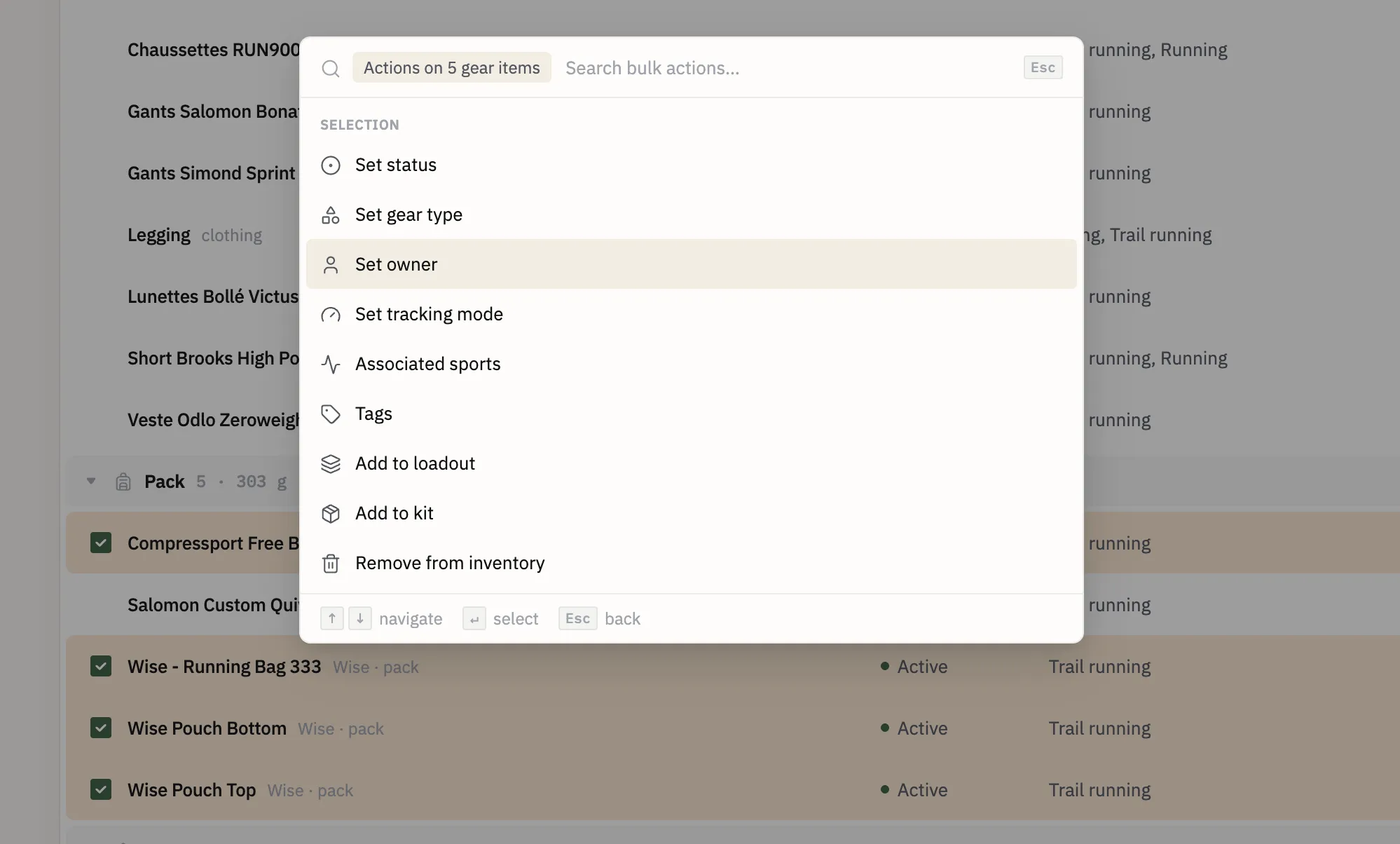
Selecting multiple gear rows and applying a bulk action
Features
  • Select multiple rows on the Inventory, Loadout, and Kit tables and act on all of them at once — change status, gear type, owner, tracking mode, sports, tags, add to loadout or kit, or remove, all in one action with a single Undo
  • Keyboard support for multi-select: press x to select the focused row, shift+J/K to extend the selection, and ⌘A to select everything visible
  • Delete your account from settings — your data is kept for 30 days in case you change your mind, then permanently removed
Fixes
  • ⌘K now opens straight into bulk actions when rows are selected
  • Row checkboxes have a larger, easier-to-hit target area
  • Shift-clicking a row no longer selects surrounding text
  • Clicking an already-open row panel now closes it, on Inventory, Loadouts, and Kits
v1.2.1
September 4, 2026
v1.2.1 · September 4, 2026

Fixes header height and menu bugs on the Shelves page, and the same popover-stacking bug in the Loadout gear menus.

Fixes
  • Shelves section headers were too tall, now sized like other group headers
  • Shelves row menu had too much padding, and could render behind other content instead of in front
  • Loadout gear menus had the same popover-stacking bug, fixed at the root cause
v1.2.0
September 3, 2026
v1.2.0 · September 3, 2026

Adds Shelves — saved inventory views you can pin to the sidebar, now with folders — and moves loadout containers to belong to the trip rather than the gear.

Features
  • Shelves: save an inventory view and pin it to the sidebar
  • Favorites can now be organized into folders
Fixes
  • Loadout containers now belong to the trip, not the gear
Design
  • Polished header and group row styling, and fixed collapse toggles
v1.1.0
September 2, 2026
v1.1.0 · September 2, 2026

Replaces the row quantity stepper with a compact marker and adds a docked item panel for loadout and kit gear.

Features
  • Clicking a loadout or kit gear row now opens an item panel with full details and a quantity control
  • Tag and carrier are now editable from that panel, instead of read-only
  • Gear rows on phone now open the same panel as a sheet, matching desktop
Design
  • Replaced the quantity stepper column with a compact ×N marker beside the name, freeing a table column
v1.0.0
September 1, 2026
v1.0.0 · September 1, 2026

The first stable release of the new Stowra: your whole inventory, loadouts and kits, sharing, and the people you pack with.

Features
  • One inventory for everything you own, with photos, and any item able to hold others — a pack, a pouch, a dry bag
  • Build a loadout for a trip out of that inventory and watch it total itself as you go, with worn, carried and consumable weight counted separately
  • Publish any loadout or kit as a page anyone can open, with a preview image and per-link control over what stays private
  • Share a workspace with the people you pack with, and keep gear for someone who has no account of their own
  • Connect an assistant like ChatGPT or Claude to your workspace, and let it read your gear or add to it
  • Search and shortcuts everywhere, all behind ⌘K
  • Works offline and installs as an app on your phone
  • Every change is recorded and can be undone
  • Settings for how the app looks and works: theme, colour palette, avatar, email, and the categories in your sidebar
Fixes
  • A round of polish across panels, row selection, the sidebar, and the phone layout
v1.0.0-beta7
September 1, 2026
v1.0.0-beta7 · September 1, 2026

A round of polish on panels, the sidebar, and keyboard access.

Fixes
  • Fixed the side panel background, and a row staying highlighted after switching to another item
  • The sidebar now collapses before a table would need to scroll sideways, rather than after
  • The phone layout now settles on its final size instead of flickering through an in-between one
  • ⌘K now opens even while a side panel is open
  • Items not yet assigned to anyone now show up in the loadout checklist
v1.0.0-beta6
August 31, 2026
v1.0.0-beta6 · August 31, 2026

Escape closes the side panel, and a connected assistant now uses the same gear categories you do.

Features
  • Escape now closes the side panel on desktop
Fixes
  • A connected assistant now picks gear categories from the same fixed list the app uses, so what it adds is grouped like everything else instead of drifting into categories of its own
v1.0.0-beta5
August 30, 2026
v1.0.0-beta5 · August 30, 2026

A connected assistant can now edit gear you already own, not just add to it.

Features
  • An assistant can now change an existing item in place, instead of having to create a near-duplicate
  • It can also create items you track by quantity — how many, and in what unit — directly
v1.0.0-beta4
August 30, 2026
v1.0.0-beta4 · August 30, 2026

Stowra opens up to things that are not a browser: a script, an assistant, or any app you approve.

Features
  • Connect an assistant and let it read your gear, add to it, and have a whole import undone in one go if you change your mind
  • Approve another app through a consent screen where you pick the workspace and untick anything you would rather it could not do
  • Create access keys in Settings → Workspace → API, each tied to one workspace and shown to you once
  • Disconnect any key or app whenever you like, and see when each was last used
  • Anything a key does is attributed to it in your activity feed, and can be undone
  • A key never gets more access than you have yourself, and loses the ability to make changes the moment your own role does
  • Members, invitations, workspace settings and share links stay out of reach of every key, whatever it holds
v1.0.0-beta3
August 29, 2026
v1.0.0-beta3 · August 29, 2026

Workspaces you can create, delete, and leave.

Features
  • Create a workspace of your own, naming it and picking what kind it is
  • Delete a workspace you own, behind a typed confirmation, with its photos removed too
  • Leave a workspace from settings
  • If a workspace disappears from under you — deleted by another owner, or left in another tab — the app moves you somewhere valid instead of getting stuck
Fixes
  • Workspace type chips no longer overflow on narrow phones
  • Creating a workspace no longer hangs if the connection drops mid-way, and pressing the button twice can no longer create two
v1.0.0-beta2
August 28, 2026
v1.0.0-beta2 · August 28, 2026

Mobile polish on top of the first beta.

Features
  • How the app feels on a phone: gestures, motion, and depth
v1.0.0-beta1
August 25, 2026
v1.0.0-beta1 · August 25, 2026

The first release of the rebuilt Stowra — a fresh start covering the whole app: inventory, loadouts, kits, sharing, and packing on your phone.

Features
  • Inventory, loadouts and kits, with gear that can hold other gear and drag-and-drop to fill a pack
  • Photos on your gear
  • A loadout builder that totals weight as you build, against a target if you set one
  • Public share pages for a loadout or kit, with a preview image and privacy controls
  • Workspace members and invitations, with roles that decide who can change what
  • A full history of changes, with undo
  • Search that knows where you are, and keyboard shortcuts throughout, both behind ⌘K
  • A layout that works on a phone, offline, and installs to your home screen
  • Settings for your profile, the people you keep gear for, theme, and colour palette